Home / Technologies / Microsoft SharePoint Online
SharePoint and OneDrive: files organised and shared safely
SharePoint is where a team keeps its shared files, and OneDrive is each person's own space. Together they replace email attachments and the shared folder nobody trusts.
What we do for you
- Team sites and document libraries set up around how your business works.
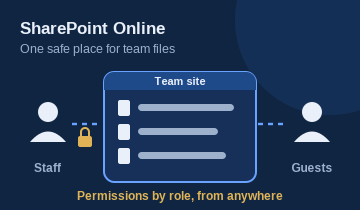
- Permissions that decide who can see and who can edit.
- Sharing with staff and guests in a controlled way.
- Files reachable from anywhere, on any device.
Why it helps
One place for files
Everyone opens the same, latest version.
Control who sees what
Permissions keep private files private.
Safer than attachments
Share a link with the right people instead of sending copies around.
A better home for company files
Microsoft SharePoint Online is Microsoft's service for storing, sharing and organising a team's documents. Compared with a shared folder on an office computer or an old file server, it is available from anywhere, keeps earlier versions of a file, lets several people edit the same document at once, and can be backed up and secured centrally.
How we organise it
- Sites per team. Finance, sales, operations and projects each get their own space.
- Libraries and folders. A simple, agreed structure, so people know where a file belongs.
- Permissions by group. Access is given to groups, not to individuals, so adding someone to a team is one step.
- External sharing rules. Customers and suppliers can receive links, but only where you allow it.
- Sync to the computer. People can open files from Windows Explorer, as they are used to.
Why it saves time
Documents stop travelling as email attachments. People share a link and everyone works on the same file. If someone makes a mistake, the version history brings back the earlier copy. Search finds a file by its content, not only by its name.
Moving your files
We copy your existing shared folders into SharePoint and OneDrive and rebuild the permissions so no one sees what they should not. Read how in email and file migration, and see the daily workflow in Teams, SharePoint and calling.
How we work
Check
A free review of your setup, risks and costs.
Agree
We sign the service covenant: scope, response times, price.
Onboard
We migrate, secure and document everything.
Run
Tickets, monitoring and a monthly report keep it healthy.
How we charge
Your price depends on how many people use IT at your company: a fixed monthly price in Egyptian pounds, with no surprise bills. If you only need occasional help, you can pay per ticket. Migrations and projects are quoted at a fixed price after your free cloud health check.
See the price calculatorQuestions
Can we share files with clients?
Yes. Guests can be given access to the files you choose, with permissions you control.
Can you move our old file server?
Yes. We move files from file servers into SharePoint and OneDrive.
Is it backed up?
We can add automatic backup of your files, with recovery tested every quarter.
Book your free cloud health check
We review your setup and send a short report with a clear plan and price. No obligation.
Request my health checkMessage us on WhatsApp