Home / Technologies / Microsoft Teams Phone System
Microsoft Teams Phone System: your business phone, inside Teams
Microsoft Teams Phone System turns Teams into your company phone. Customers call one number, and the call reaches the right person, wherever they are working.
What we do for you
- Auto attendant that greets callers and sends them to the right place.
- Call queues so calls are answered in order by a team.
- Call routing that fits your hours and your people.
- Connection to a phone provider that works in your country.
Why it helps
One number for the company
Customers do not need to know who sits where.
Calls follow your people
Answer from a laptop or phone, in the office or outside it.
Fewer missed calls
Queues and routing make sure calls reach someone.
How a call reaches your team
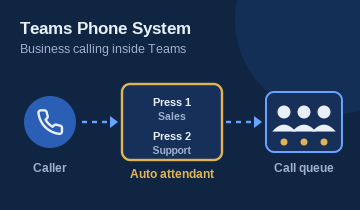
With Microsoft Teams Phone System, your company number rings in Teams. A customer dials a normal number. The call can be answered on a laptop, on a mobile app or on a desk phone, and it can be transferred between colleagues like any office call.
What we set up
- Auto attendant. A recorded greeting with options, such as press 1 for sales, press 2 for support.
- Call queues. Several people share a number and callers wait in order, with music or a message.
- Hours and holidays. Different routing in the evening, on weekends and on public holidays.
- Voicemail to email. Messages arrive in your inbox.
- Devices. Headsets or desk phones that work well with Teams.
The phone line itself
Teams needs a connection to the public phone network. The method depends on the country. Where Microsoft's own calling plans are not offered, the usual option is to connect Teams to a local telephone provider through a service called Direct Routing. We check what is available for your company, discuss the cost with you, and handle the technical connection. Whether you can keep your current number depends on your current provider, and we check that before you commit.
Is it right for you?
It suits companies where people are often out of the office, work from home or have more than one branch. If you have one office and one desk phone that rarely rings, it may not be worth changing. We will tell you honestly after the free health check. Learn more on Teams, SharePoint and calling.
How we work
Check
A free review of your setup, risks and costs.
Agree
We sign the service covenant: scope, response times, price.
Onboard
We migrate, secure and document everything.
Run
Tickets, monitoring and a monthly report keep it healthy.
How we charge
Your price depends on how many people use IT at your company: a fixed monthly price in Egyptian pounds, with no surprise bills. If you only need occasional help, you can pay per ticket. Migrations and projects are quoted at a fixed price after your free cloud health check.
See the price calculatorQuestions
Do we need a phone provider?
Yes. We connect Teams to a phone provider that works in your country.
Can we keep our current number?
This depends on your current provider. We check it with you before we start.
Can several people answer one number?
Yes, through call queues.
Book your free cloud health check
We review your setup and send a short report with a clear plan and price. No obligation.
Request my health checkMessage us on WhatsApp